Back to glossary

Azure Policy

Microsoft's native governance service for evaluating and enforcing rules against Azure resource configurations, at the management-group, subscription, or resource-group level.

How Azure Policy works

Azure Policy attaches policy definitions – written in JSON – to a scope, so resources created or updated in that scope are evaluated against a rule. Definitions describe the conditions to match and the effect to apply; initiatives group related definitions together.

Because it is built into Azure, there are no agents to install. Resource create and update requests are evaluated through the Azure Resource Manager request pipeline, while compliance evaluations also identify existing resources that do not meet the assigned rules.
Diagram of Azure Policy evaluating a create or update request against an assigned policy definition
Figure 1. How Azure Policy evaluates a create or update request against an assigned definition.
  1. Define the rule. Choose a built-in definition or write a custom policy.
  2. Assign the scope. Apply it to the management group, subscription or resource group.
  3. Evaluate the resource. Azure applies the configured effect to matching resources and requests.

Audit, Deny and other policy effects

Not every Azure Policy effect blocks a change. The effect determines whether a rule only reports a violation, prevents a request, adjusts supported properties or deploys missing configuration.

Audit

Records non-compliance without blocking the request. Use it to understand where resources fall outside a policy before deciding what to enforce.

Deny

Blocks a matching non-compliant create or update request before the requested configuration takes effect. It does not automatically repair resources that already exist.

Modify

Adds, removes or updates supported properties or tags on a request. Existing non-compliant resources need a remediation task and an appropriately permitted managed identity.

DeployIfNotExists

Deploys missing related configuration when its conditions are met after a resource is created or updated. Existing resources require a remediation task and the necessary managed-identity permissions.

Existing resources need a remediation plan. A compliance scan does not itself fix a resource. Modify and DeployIfNotExists can remediate existing resources through appropriate remediation tasks with the required permissions. Audit and Deny do not automatically correct existing configuration.

Enforcement and scopes

Assign policies at the management-group, subscription or resource-group level to apply rules at the right boundary. Higher-level assignments apply to resources within that scope, including its child scopes. Use deliberate exclusions or tracked exemptions where a legitimate need conflicts with a rule.

Azure Policy scope hierarchy: management group, then subscription, then resource group
Figure 2. Azure Policy scopes: management group, subscription and resource group.

Enforcement is more than assigning a definition. The selected effect, the assignment's enforcement setting and any exemptions determine what happens. Start by assessing violations and legitimate deployment activity, tune the scope, and test before enabling a blocking effect in production.

Explore granular policy scoping

Example: prevent public blob access

A team requires its production storage accounts to disallow public blob access. It assigns a policy with a Deny effect to its production subscription and enables enforcement.
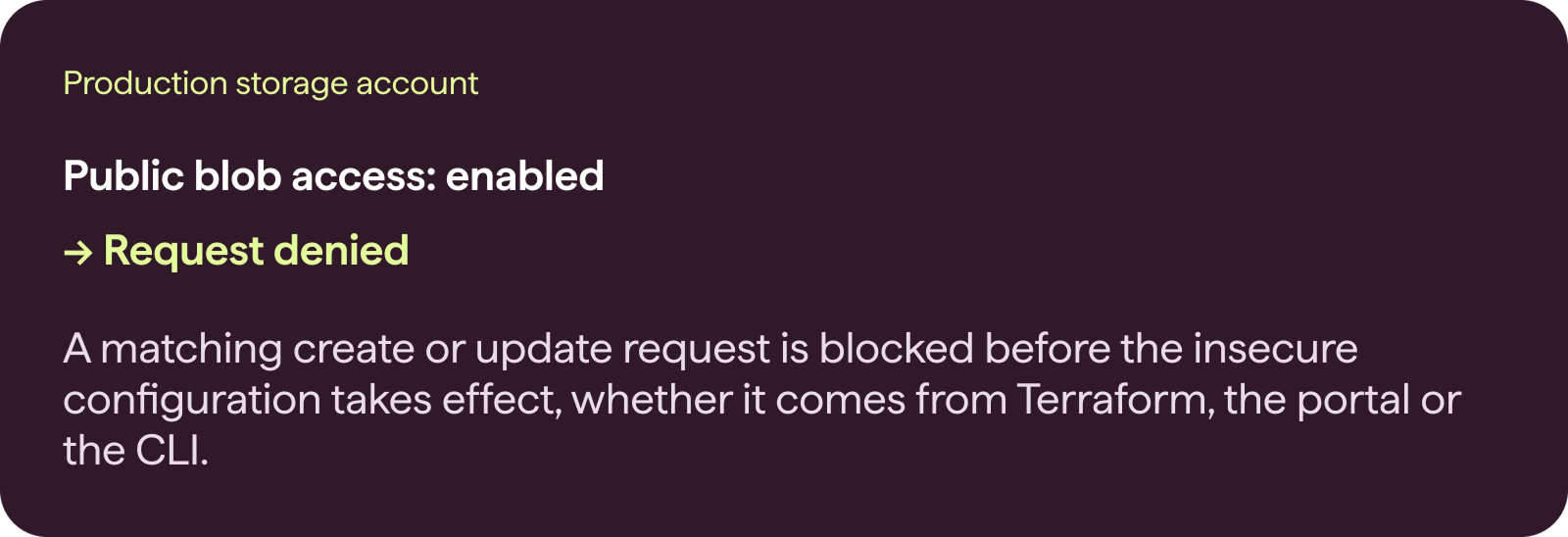
A Deny assignment blocking a request to enable public blob access on a production storage account
Figure 3. A Deny assignment blocking a request to enable public blob access on a production storage account.

In Audit mode, the same request would be allowed and the violation reported. A Deny assignment does not make existing storage accounts private: identify non-compliant resources and remediate them separately.

From audit to preventive security

Azure Policy's Deny effect evaluates a change at the Azure control plane before the requested configuration takes effect. That makes it a native building block for preventive cloud security: the same rule can apply regardless of whether a change originates from IaC, the console, the CLI or an AI agent.

A poorly tested policy can also block a legitimate deployment. Aryon adds impact assessment, granular scoping and exception management so teams can understand a policy's effect, tune it and move from Audit to enforcement with confidence. This complements CSPM's visibility into deployed resources and IaC scanning earlier in development; it does not replace them.

Explore preventive cloud security

Frequently Asked Questions

What is Azure Policy?
Azure Policy is Microsoft's native governance service for evaluating Azure resource configurations against rules you define, then auditing or enforcing compliance across a management group, subscription, or resource group. It works by attaching policy definitions – written in JSON – to a scope, so every resource created or updated in that scope is checked against the rule. Effects range from Audit (log only) to Deny (block the request) to Modify or DeployIfNotExists (auto-correct or add missing configuration). Because it's built into Azure itself, Policy has no agents to install and evaluates resources as part of the Azure Resource Manager request pipeline.
What is Azure Policy enforcement?
Azure Policy enforcement means using a Deny or Modify effect so a non-compliant request is blocked or automatically corrected at the moment it's submitted, rather than just logged for later review. That's the difference between Audit mode, which tells you what's wrong, and Deny mode, which stops the wrong configuration from ever being created. Enforcement is where most teams hesitate, since a poorly tested Deny policy can block a legitimate deployment. Aryon adds the impact assessment and policy lifecycle needed to understand the effect of enforcement, tune policies where needed, and move from Audit to Deny with confidence instead of guessing.
What tools help manage Azure Policy at scale?
Native Azure Policy supports policy management across subscriptions and management groups, but coordinating definitions, initiatives, and assignments consistently across a large and complex Azure environment can become difficult to manage. Aryon provides a centralized policy and enforcement layer across the environment, with the scoping, exception management, and impact assessment needed to safely enforce security policies at scale.
How do you enforce Azure Policies across multiple subscriptions?
Policies need to be assigned at the right scope – management group, subscription, or resource group – and kept consistent as new subscriptions are added, which is easy to do once and hard to maintain by hand. Aryon centralizes that policy and enforcement model so security rules can be applied consistently across the environment.
How do you automate Azure Policy management?
Automating Azure Policy management means treating policy definitions and assignments as code – version-controlled, tested, and deployed through a pipeline – rather than clicking through the Azure portal for every subscription. Aryon's policy marketplace and AI-generated recommendations extend that automation further by helping teams identify relevant policies and reduce the need to define every rule manually.
How do you automate Azure Policy compliance?
Compliance is automated by mapping a framework's requirements – CIS, NIST, PCI-DSS, and similar – directly to enforceable policy definitions, so a resource can't be created out of compliance in the first place. Aryon tracks coverage against these frameworks and enforces the underlying policies continuously, rather than relying on periodic compliance scans to catch drift after it's already happened.
How do you prevent Azure Policy violations before deployment?
Violations are prevented by evaluating a change against policy before the requested configuration takes effect. Azure Policy's Deny effect enforces this at the Azure control plane, so the same rule applies regardless of whether the change originates from Terraform, the Azure portal, the CLI, or an AI agent. Aryon enables organizations to define these security policies once and consistently manage and enforce them across their Azure environment.
How do you use Azure Policy for cloud security governance?
Azure Policy becomes a governance tool when definitions are tied back to an organization's actual security standards and ownership model – who can grant an exception, which teams own which scopes – rather than being a disconnected technical control. Aryon adds that governance layer on top: centralized policy ownership for the security team, with a tracked, auditable exception process for the cases where a legitimate business need conflicts with the rule.
How do you create preventive Azure security guardrails?
A preventive guardrail is a policy set to actively block a non-compliant action, not just report on it – in Azure Policy terms, that means using Deny or Modify effects instead of Audit. Aryon helps teams get there safely by simulating a guardrail's impact against real activity first, so it can move from audit to enforcement without breaking something already running.
What is Azure Policy as Code?
Azure Policy as Code is writing policy definitions, initiatives, and assignments in a structured, version-controlled format – typically JSON or Bicep – and deploying them through a CI/CD pipeline, the same way infrastructure is deployed. It makes policy changes reviewable, testable, and auditable, instead of living only as manual portal configuration that's hard to track over time.
How does Azure Policy relate to Azure Conditional Access?
Azure Policy governs resource configuration – what a storage account, VM, or network rule is allowed to look like. Azure Conditional Access is a separate Microsoft Entra ID capability that governs identity and session-level access – who can sign in, from where, and under what conditions. They operate at different layers and are typically managed separately. Aryon's enforcement covers cloud resource configuration, cloud operations, and how resources can be accessed or used, while Conditional Access governs user authentication and session-level controls.

Ready to take your first proactive step?