
Exploiting Cloud Misconfigurations, Part 2: How Attackers Discover Cloud Resources
The first thing an attacker needs is a target, so an attack naturally begins with resource discovery. During discovery, the attacker builds and expands a database of resource identifiers. These resources are then checked periodically for exploitable conditions. A resource may be discovered long before an opportunity to exploit it arises.


Cloud resource discovery is the first step in a cloud attack path: before an attacker can exploit a misconfiguration, they need to know that a resource exists and what it is called. For services such as Azure Storage and Amazon S3, discovery requires no credentials and no access to the victim's environment, only the ability to test candidate names against public DNS or HTTP endpoints.
The first thing an attacker needs is a target, so an attack naturally begins with resource discovery. During discovery, the attacker builds and expands a database of resource identifiers. These resources are then checked periodically for exploitable conditions. A resource may be discovered long before an opportunity to exploit it arises.
The usual approach to resource discovery involves two steps:
- Finding large pools of resource names that contain a high proportion of names in use.
- Checking each candidate name to determine whether the corresponding resource exists and, if it does, adding its identifier to the database.
In this section, we’ll focus on how attackers discover cloud resources such as Azure Storage Accounts and Amazon S3 buckets. This is Part 2 of our Exploiting Cloud Misconfigurations 101 series; Part 1 covers the basics.
How Does Network Access to PaaS Resources Work in Azure and AWS?
In Azure and AWS, the Shared Responsibility Model divides management duties between you and the CSP. The division of responsibilities varies across three common cloud service models:
IaaS - Infrastructure as a service
When using the IaaS model, the CSP manages the physical infrastructure and virtualization, while you retain control over the operating systems, networking, and application code (e.g. Virtual Machines).
PaaS - Platform as a service
Under the PaaS model, the CSP also manages the operating system, while you remain responsible for your applications, data, identities, and the access controls available to you.
SaaS - Software as a Service
Under the SaaS model, the CSP manages the application and its underlying infrastructure, while you remain responsible for your data, user access, and some security settings.
Networking controls of the different models differ.
In IaaS, network security relies on firewall rules, public and private IP addressing, and your control over networking components such as route tables and load balancers, much like in an on-premises environment. For example, you can create a Virtual Machine, connect it to a Virtual Network, and assign it a public IP address. Whether it can be reached over the internet depends on the routing and firewall rules you configure.
In most PaaS resources, network security works a bit differently. The cloud service provider (CSP) controls the resource’s underlying network. You can configure which networks can access your resource. The services Public endpoints share IP addresses across vast number of resources, from different tenants, so an IP address alone does not identify the target resource.
When traffic reaches the public service endpoint, the service identifies the target resource using the HTTP request’s Host header, which includes the resource identifier, and applies that resource’s network access restrictions. For example, a request sent to the public endpoint of a “private” Storage Account is rejected at the application level, with an HTTP 403 response, rather than blocked at the network level.
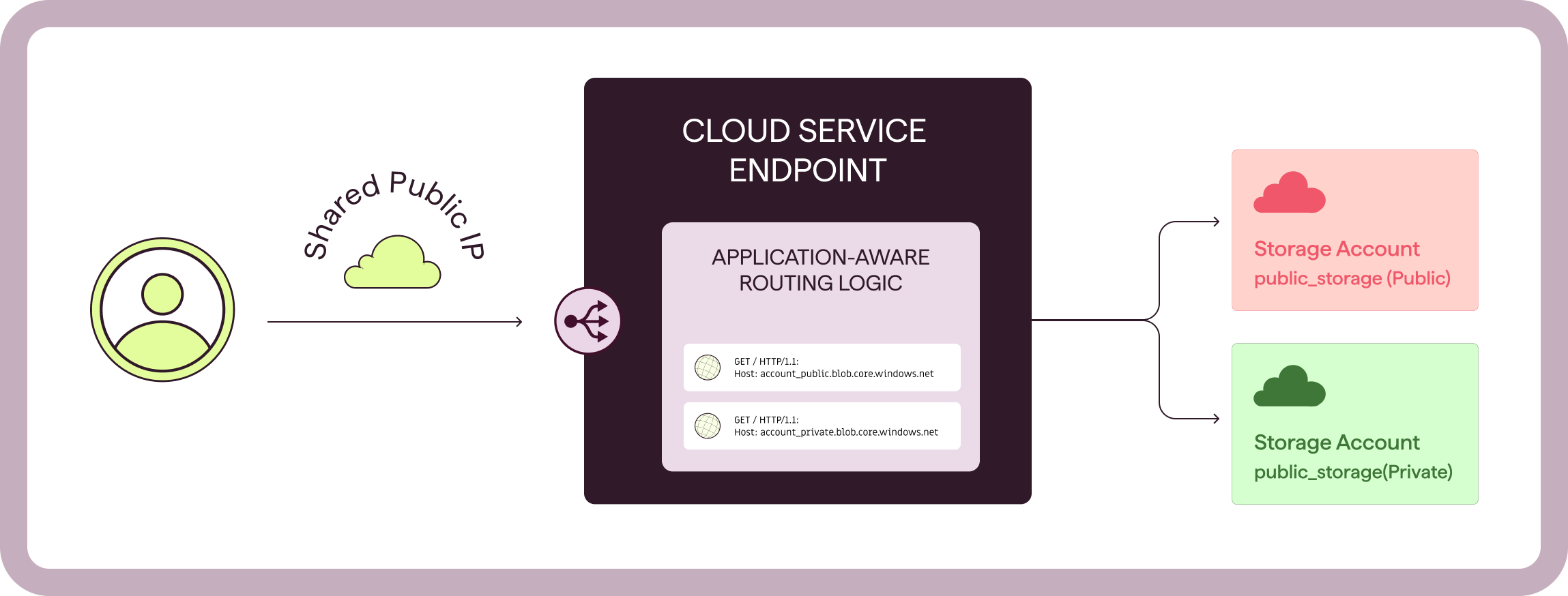
This breakdown reflects common networking patterns associated with the Shared Responsibility Model (SRM), but service classifications do not always align with these patterns. For clarity, we use IaaS-like and PaaS-like to describe the network access models discussed here: not every PaaS resource is identified through an HTTP Host header, and not every IaaS resource has its own IP address.
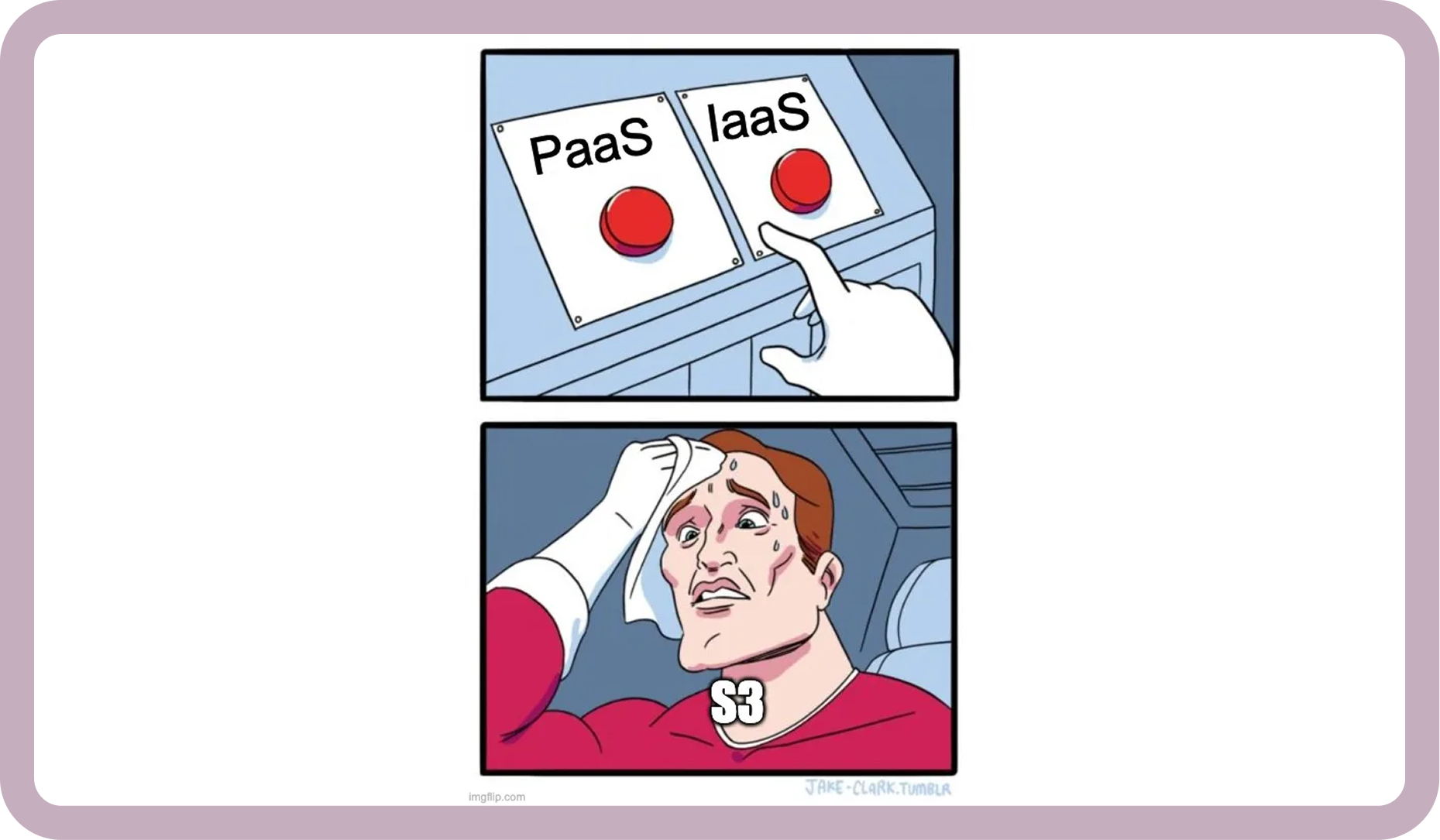
For example, Amazon S3 is variously described as IaaS or PaaS, yet its networking and access-control model resembles that of the PaaS services described above. Throughout this section, we group services by how they implement network access rather than by their formal service classification.
How Do Attackers Check Whether a Cloud Resource Exists?
In PaaS-like resources the resource names are globally unique. Resource creation will fail with descriptive error if the name is already in use. This leads to a clear and fundamental conclusion: there must be a way to check whether a resource name is taken!
The simplest way is to iterate over candidate names, for each create a new instance with the given name, and based on the response you can determine if taken or not.
This is quite slow and impractical at scale, so used a better way to run this check.
Azure Storage Accounts: checking existence with a DNS query
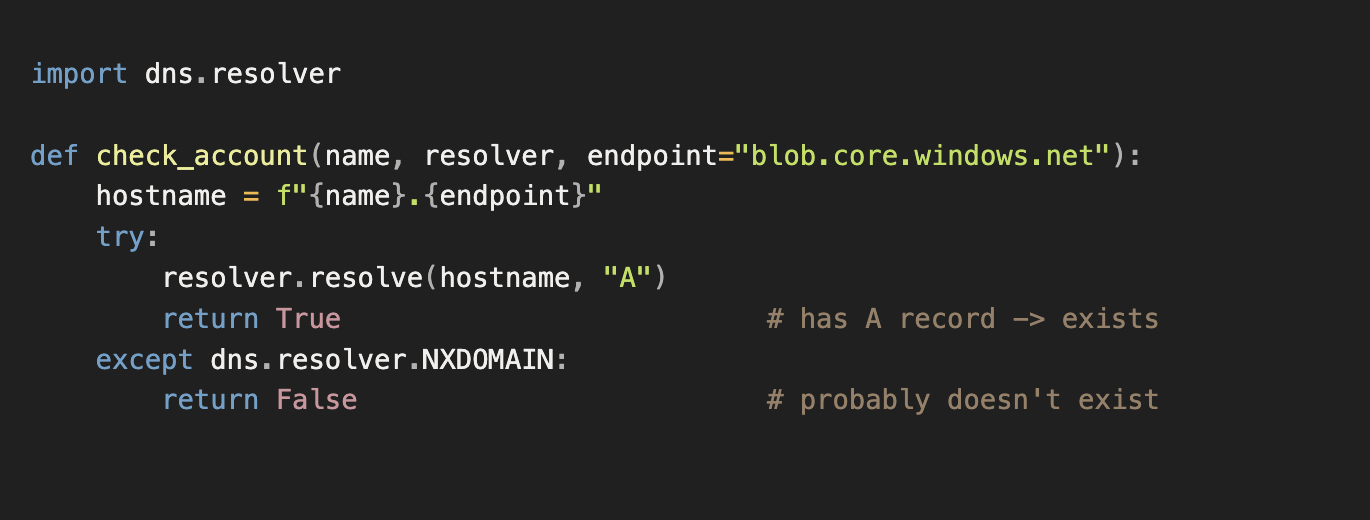
In Azure, a simple, lightweight approach is just to send a DNS query. Successful resolution generally indicates that the resource exists, and failure that it doesn’t, making it a useful heuristic for resource discovery.
Standard Blob Storage endpoints in Azure follow this FQDN pattern:

The public hostname remains resolvable even when public network access is disabled. The following simple Python script checks if a Storage Account exists for a given name.
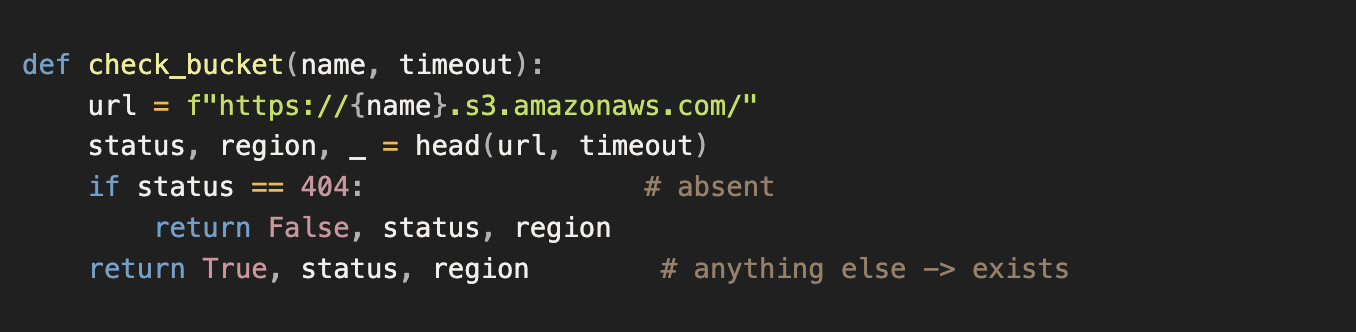
AWS S3 buckets: checking existence with an HTTP HEAD request
AWS makes this a bit more difficult. For each candidate S3 bucket name you query you get a response pointing you to a regional S3 endpoint, whether the name is used or not, so checking names based on DNS responses will be pointless. To check whether a bucket name is in use, send a HEAD request to its endpoint. Receiving a 404 response means the resource doesn’t exist, while any other 4XX or 2XX response, heuristically means it does exist.
For this check, we use the following S3 endpoint format:

The following simple Python script checks if an S3 bucket exists for a given name.
Note on newer buckets: since March 12th, 2026, AWS lets customers create general purpose buckets in an account regional namespace, with names that end in -<account-id>-<region>-an. Existing buckets stay in the global namespace and cannot be renamed, so the checks above still apply to them and to any new bucket created in the global namespace. For a bucket in the new namespace, an attacker needs the account ID as well as the prefix. The 3- and 4-character names tested below can only exist in the global namespace.
Sources of Resource Names
Resource names can come from leaks, enumeration, and other scanning methods.
Data leaks
Data leaks are often referenced as the source of leaked credentials, like in the example reviewed earlier: the Volkswagen and Cariad. But leaked data can range from keys and passwords to resource names or even entire Terraform state files that expose large portions of an organization’s infrastructure, including resource names. This information can be valuable when building name pools, either directly by revealing resource names or indirectly by uncovering the organization’s naming patterns.
Web indexing
Names can also come from publicly indexed content in search engines. Crawlers index publicly accessible pages and follow links, potentially revealing Storage Account or S3 bucket names along the way.
For example, you can search Google directly using the following queries:
site:blob.core.windows.netfor Azure Storage Accountssite:s3.amazonaws.comfor AWS S3 buckets
These results can help build a large name pool.
Enumerating Name Pools
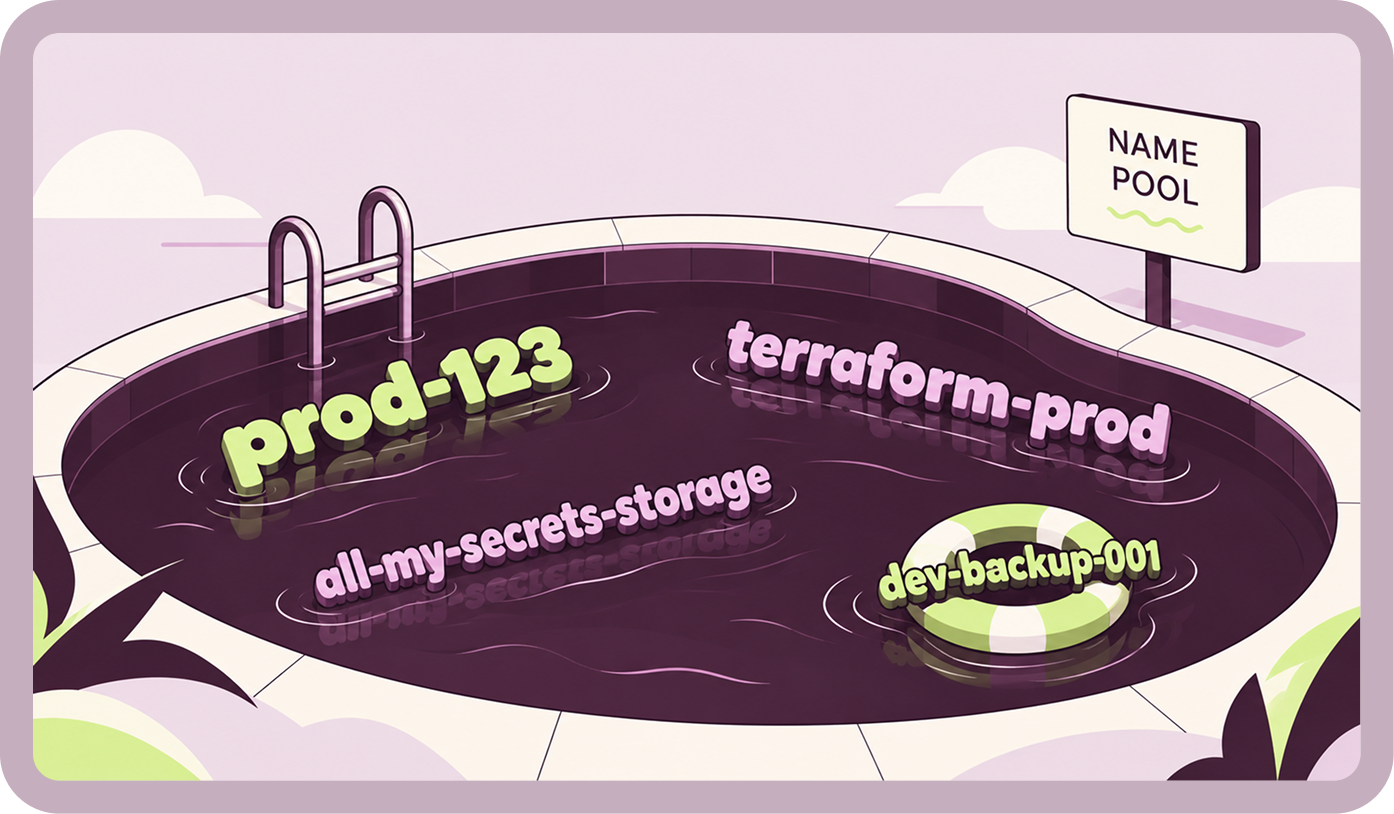
One way to build large, untargeted name pools is to generate candidate resource names systematically. The process is similar to building dictionaries for a password dictionary attack.
Start with understanding the constraints. A password has to satisfy a policy: minimum length, required character types and forbidden characters. A resource name has to satisfy the provider's naming rules. An Azure Storage Account name, for example, can only contain lowercase letters and digits, and must be 3 to 24 characters long. In both cases, the rules shrink the search space for us before we generate a single candidate.
So how do we build the name pool? The same three ways we'd build a password list.

Brute force
Enumerate and test every possible combination for a specific name length.
Dictionary
Generate likely names from common keywords and published naming conventions, combining and modifying them much like password-cracking tools mutate entries in a wordlist. This is how hashcat for example mutates known passwords from the rockyou.txt wordlist.
Targeted
Building custom candidate lists around a specific company's brand names, environments, regions, or known internal naming patterns, much like CeWL builds password dictionaries by scraping a target's website.
We can apply every one of these approaches for cloud resources and build a cloud resource name enumerator. It generates candidate names - whether by brute force, convention-driven dictionaries, or targeted lists and checks to see if a live resource sits behind each one.
How Effective Is Brute-Force Enumeration?
In the next part we are going to deep dive into different types of name pools, categorize them by quality and explain which conditions must be met for different type of attacks.
As a teaser, we compared Azure Storage Accounts and AWS S3 buckets using the simplest brute-force pools: names containing three and four characters, with an additional five-character pool tested for Azure. We used only lowercase letters and digits, the characters allowed in both Azure Storage and AWS s3 buckets, for a consistent comparison. This gives 36ⁿ possible names for each name length n.
For Storage Accounts with 3, 4 and 5 characters. Lets see the results:

In our experiment, exhaustive enumeration became substantially less efficient at five characters: testing roughly 60 million candidates took around 30 hours and produced a hit rate of just 0.072%. This suggests that finding smaller pools with higher hit rates may be a better use of scanning time.
Enumerating AWS S3 Buckets with brute force iteration shows a similar decline in hit rate as name length increases. We checked Buckets with 3 and 4 characters (we skipped the 5 chars this time).

Every discovered resource is a potentially valuable candidate worth saving for further assessment. But a name pool’s value for initial discovery does not necessarily determine whether it is worth checking repeatedly. Which pools justify ongoing monitoring? We will explore that question in the next part.

Frequently Asked Questions
Notes & Sources
Continue reading

Ten Years Is a Long Time to Be Wrong
For nearly a decade, a cloud misconfiguration at Toyota left sensitive vehicle data belonging to approximately 2.15 million customers accessible from the internet. What began as a single configuration mistake in 2013 went undetected until 2023, exposing a fundamental weakness in traditional cloud security: detecting misconfigurations only works when someone is looking. And when Toyota finally investigated, it uncovered additional exposures. The incident raises a critical question for every organization operating in the cloud: Why wait to discover a security risk when you could prevent it from existing in the first place?
.png)
The Key That Should Not Have Worked
A leaked cloud credential is usually treated as a detection problem. Find it, revoke it, rotate it, and move on. But the Volkswagen and Cariad data exposure raises a more important question: why was there a long-lived credential worth stealing in the first place? When a single reusable key can unlock sensitive cloud data, the leak is only part of the problem - the configuration that allowed that key to exist is the other.
.png)
The Role That Should Never Have Existed
On 29 July 2019, Capital One disclosed that an attacker had taken data relating to roughly 106 million people across the United States and Canada. The attacker was Paige Thompson, a former Amazon Web Services engineer, who was arrested the same day and convicted on computer fraud charges in June 2022. The company's settlements reached around $190 million.
Exploiting Cloud Misconfigurations: How Attackers Find Cloud Attack Paths (Part 1 - The Basics)
Cloud attacks don’t always begin with a vulnerability. Often, they begin with a misconfiguration that gives an attacker a path in. In Part 1 of this series, we look at cloud environments from the attacker’s perspective and break down the three conditions behind many exploitable cloud attack paths: Resource DIscovery, Network Accessibility, and Identity-Based Access.
Five Reasons Your Cloud Security Solution Is Failing You
Your cloud security tools may be working exactly as designed. That’s the problem.
Security teams are still finding and fixing the same misconfigurations over and over. The issue isn’t the tools-it’s a reactive model that detects risk after it already exists. Here are five signs that model has reached its limit.

50 Ways to Break Production - Why Cloud Security Remediation Is Harder Than It Looks
Cloud remediation is rarely as simple as changing a setting. Fixes can break production, require architectural changes or migrations, and conflict with IaC ownership. Prevention takes a different path: enforce the right configuration before deployment, while the resource is still cheap and safe to change. This article explores the challenges of remediating issues safely and effectively, and highlights what teams need to consider when remediation is unavoidable.