
Cloud ShutterGap: Millions of Cloud Resources Exposed - The Blind Spot CSPM/CNAPP Tools Don’t Cover
Aryon's research reveals millions of misconfigured ephemeral cloud resources, publicly exposed for only moments before being removed. Often, these exposures last only a few minutes, long enough for attackers to discover and exploit them, but too short for traditional CSPM and CNAPP tools to detect. Many of these resources contain highly sensitive information.
.webp)


Executive Summary
Cloud security has traditionally relied on the assumption that once a risky configuration is detected, defenders will have enough time to remediate it before attackers exploit it.
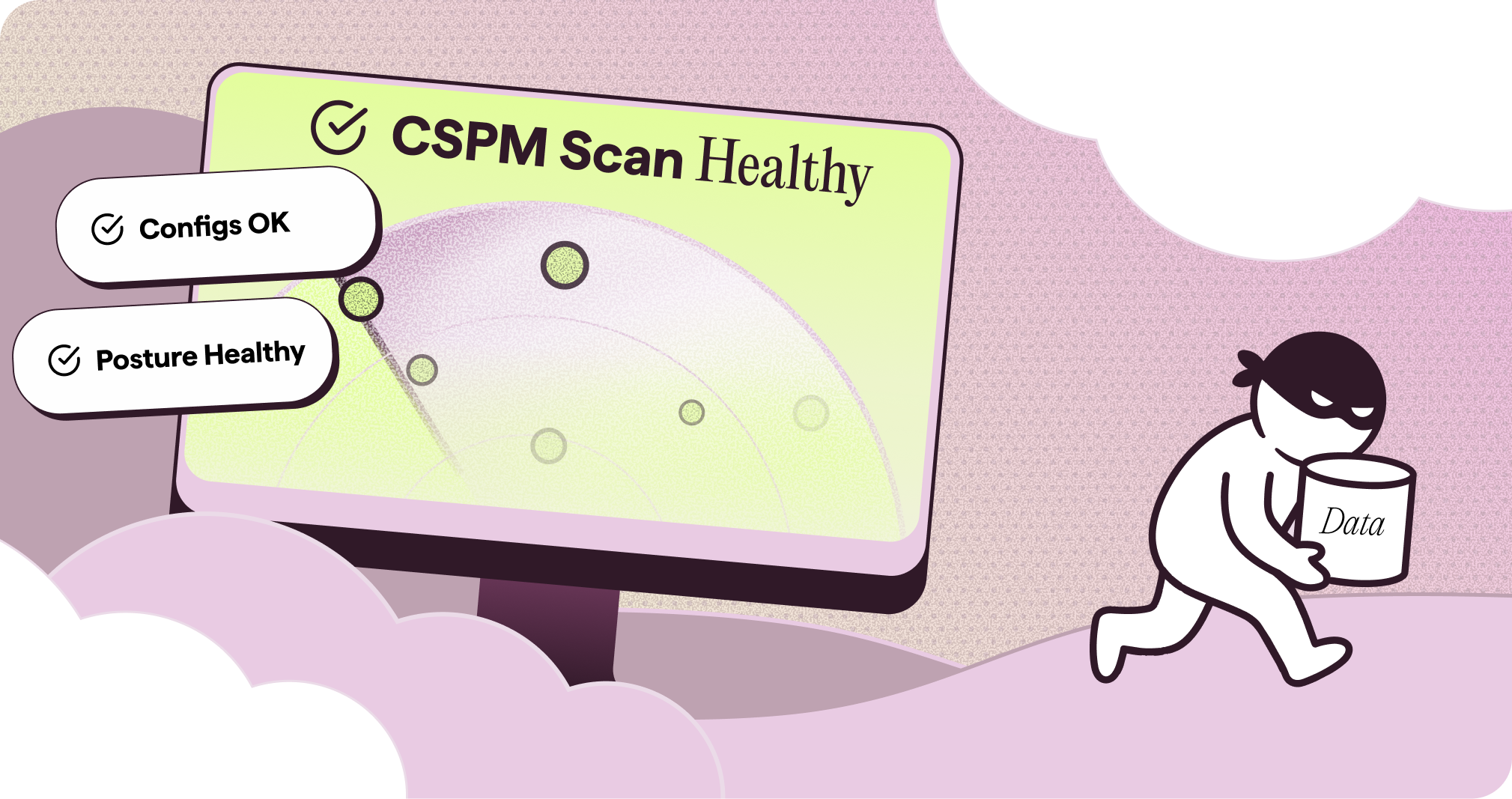
Aryon’s research shows that this assumption no longer holds for some cloud public-sharing misconfigurations. These exposures can be discovered and abused almost immediately, even when they exist for only a few minutes.
This creates a fundamental blind spot for CSPM and CNAPP tools, which typically rely on resource-intensive periodic scans, often running only once every 24 hours, followed by post-detection remediation. Many exposures appear and disappear between scan cycles, making these ephemeral misconfigurations invisible to traditional cloud security tools. Attackers, on the other hand, can use rapid, continuous scans to discover and copy the exposed resources within seconds.
Our research found large volumes of publicly shared resources being created and then deleted, including RDS snapshots, DocumentDB snapshots, AMIs, and SSM documents. Some contained sensitive data, proving this is not just a theoretical risk.

The conclusion is clear: cloud risk visibility is important, but not enough. For attack paths that can be exploited immediately, the only effective solution is prevention.
In this article, we also explain how this risk can be prevented in practice, using available preventive controls such as Service Control Policies tailored to each affected resource type.
The Real Problem With “Time to Remediate”
Traditional CNAPP models are designed to identify and prioritize risky configurations so that defenders can remediate them before attackers exploit them. However, this model only works if defenders have enough time to react.
We began with a fundamental question:
Does the reactive nature of CSPMs create an inherent blind spot?
The cybersecurity community has already recognized some limitations of the reactive CSPM model.
Some attack paths are immediately exploitable, requiring no sophisticated multi-stage campaigns and giving defenders no time to react. A single exposed resource is often all it takes.
Other misconfigurations may survive for a long time because exploitation depends on multiple conditions aligning. But once those conditions are met, exposure can turn into impact very quickly.
Many attack paths have historically remained unexploited simply because automated exploitation did not adapt well. Out-of-the-box tools often break on small environmental differences, naming changes, or unexpected configurations. In other words, many organizations were not protected because the environment was safe, but because attackers had not yet bothered to customize the exploit.
With recent developments in AI, that margin is shrinking quickly.
Recent advances in AI are changing this equation completely. Whether through specialized cybersecurity models such as Mythos, or agentic attack automation of the kind demonstrated by Palo Alto Networks’ Unit 42, the landscape is changing rapidly. CrowdStrike’s recent report points in the same direction: the gap that once protected poorly configured environments is disappearing.
This is why the old “find and remediate later” model no longer works.
In the following parts, we will demonstrate how exposed AWS resources can be discovered and attacked faster than CNAPP tools can even detect them; certainly before any human response or remediation process can take place.
What Is AWS Public Sharing?
For an attacker, AWS public sharing is the holy grail of cloud exposure: it removes many of the barriers that usually protect cloud resources.
Typically, when attempting to access a cloud resource, an attacker must overcome three main obstacles: network access, identity-based access, and discovering the resource identifier or name.
With AWS public sharing, all these barriers disappear at once!
Publicly shared AWS resources can be accessed from any AWS account, bypassing network-based restrictions. More importantly, anyone can enumerate them. AWS documentation therefore warns customers not to include private or sensitive information in publicly shared resources.
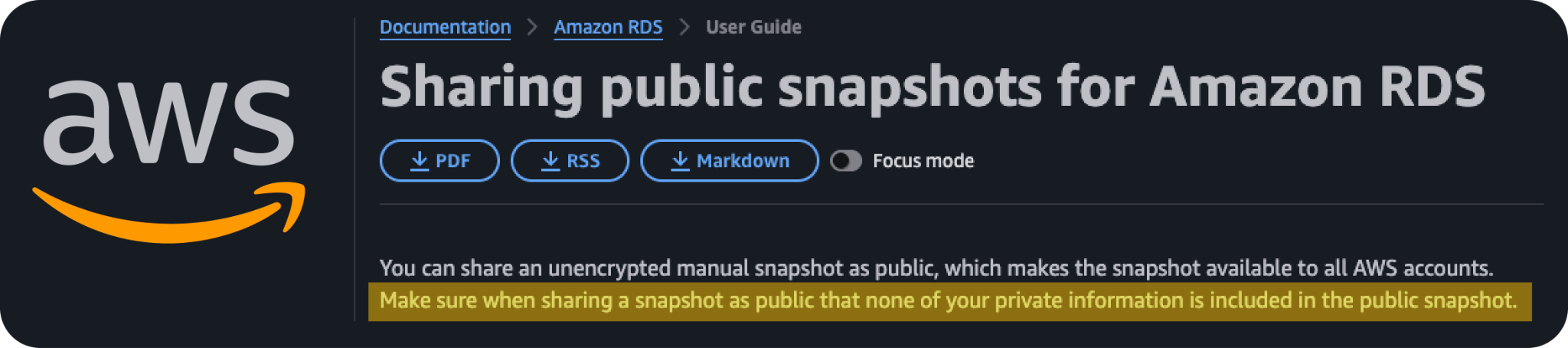
For example, the following command lists all publicly shared RDS snapshots in us-east-1:
aws rds describe-db-snapshots --region us-east-1 --snapshot-type public --include-public --query "DBSnapshots[?SnapshotType=='public'].[DBSnapshotIdentifier,DBInstanceIdentifier,SnapshotCreateTime]" --output tableThis means even a few minutes of exposure can be enough for a resource to be discovered and accessed.
Here are a few examples of AWS resources that support this concerning setting:
- RDS snapshots
- DocumentDB cluster snapshots
- SSM documents
- EC2 AMIs
- EBS snapshots
- Public ECR repositories
Let’s take a look at publicly shared RDS snapshots.
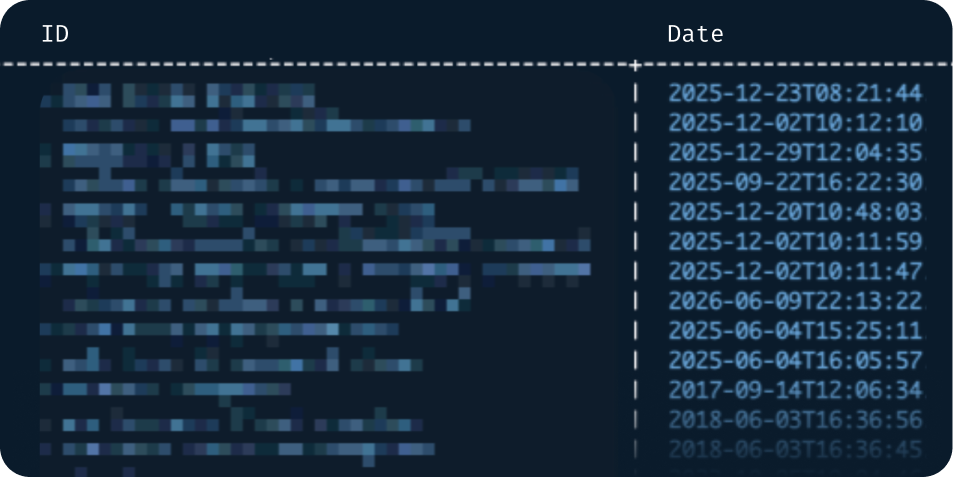
However, the critical findings emerge only when we look beneath the surface.
Reading Between the Snapshots
We noticed something strange.
The last time we checked, the number of public RDS snapshots was 185. The previous time we checked, it was 182. But when looking at the actual list, we could identify almost no newly shared public snapshots.
So we started running the list query again and again, just to see how often the number changed.
2026-06-28 18:35:53 count changed: 185 -> 186 in region us-east-1
2026-06-28 18:36:24 count changed: 186 -> 187 in region us-east-1
2026-06-28 18:37:58 count changed: 187 -> 188 in region us-east-1
2026-06-28 18:51:22 count changed: 188 -> 187 in region us-east-1
2026-06-28 18:56:15 count changed: 187 -> 186 in region us-east-1
2026-06-28 19:01:14 count changed: 186 -> 185 in region us-east-1
2026-06-28 19:35:43 count changed: 185 -> 186 in region us-east-1
2026-06-28 19:36:15 count changed: 186 -> 187 in region us-east-1
2026-06-28 19:37:50 count changed: 187 -> 188 in region us-east-1
2026-06-28 19:56:10 count changed: 188 -> 187 in region us-east-1
2026-06-28 19:56:21 count changed: 187 -> 186 in region us-east-1
2026-06-28 20:01:17 count changed: 186 -> 185 in region us-east-1
Figure 4: Changes in the number of public RDS snapshots in us-east-1 over an hour and a half. The script logs every increase or decrease in the total count.
Within 90 minutes, the count changed 12 times. There were 6 creations and 6 deletions.
These figures didn't seem to make sense.
Publicly shared resources are not inherently ephemeral. If someone intentionally shares a resource with the public, it is reasonable to expect that resource to remain available long enough for others to access it.
Could it be that while we only see a small number of "stable" public snapshots at any given moment, a far larger volume of snapshots is constantly being created and deleted due to accidental sharing?
At this point, three important questions emerged:
- How often do resource exposures occur?
- Can an attacker exploit the exposure fast enough?
- Is valuable data actually exposed?
How Often Do Resource Exposures Occur?
To understand how widespread this behavior is, we analyzed several AWS resource types that support public sharing: AMIs, DocumentDB snapshots, RDS snapshots, and SSM documents.
For each resource type, we monitored public sharing activity over several days, measuring both newly shared resources and those later removed from public access. To avoid inflating the numbers, we deduplicated the data using each resource’s unique identifier or name. This ensured that a resource was counted only once, even if it repeatedly appeared and disappeared from the public list.
The results provide an estimate of the number of distinct resources that become publicly shared each year.
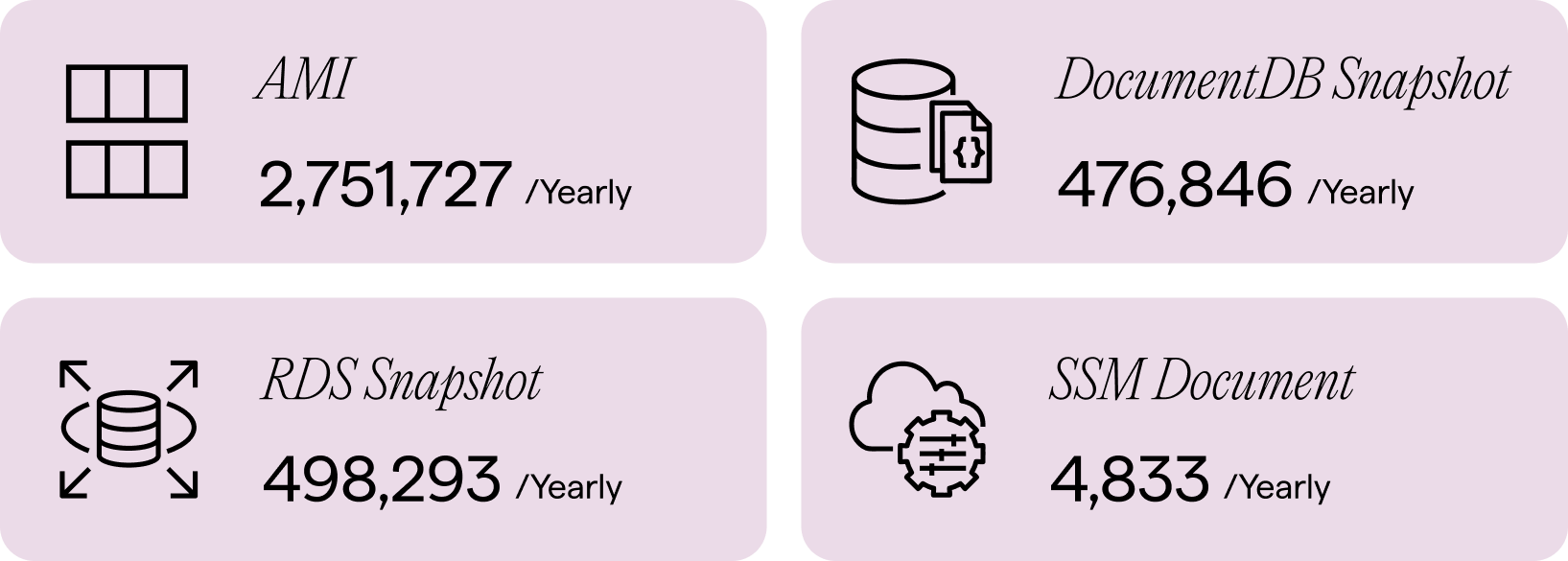
The next question is: how long does each resource remain publicly exposed? More importantly, is that exposure window long enough for an attacker to exploit it?
To answer this, we created a lifetime table for each resource type (in minutes). The numbers in the table show the percentile distribution of exposure duration: the time between a resource first appearing in the public list and later disappearing from it.
The results were surprising.
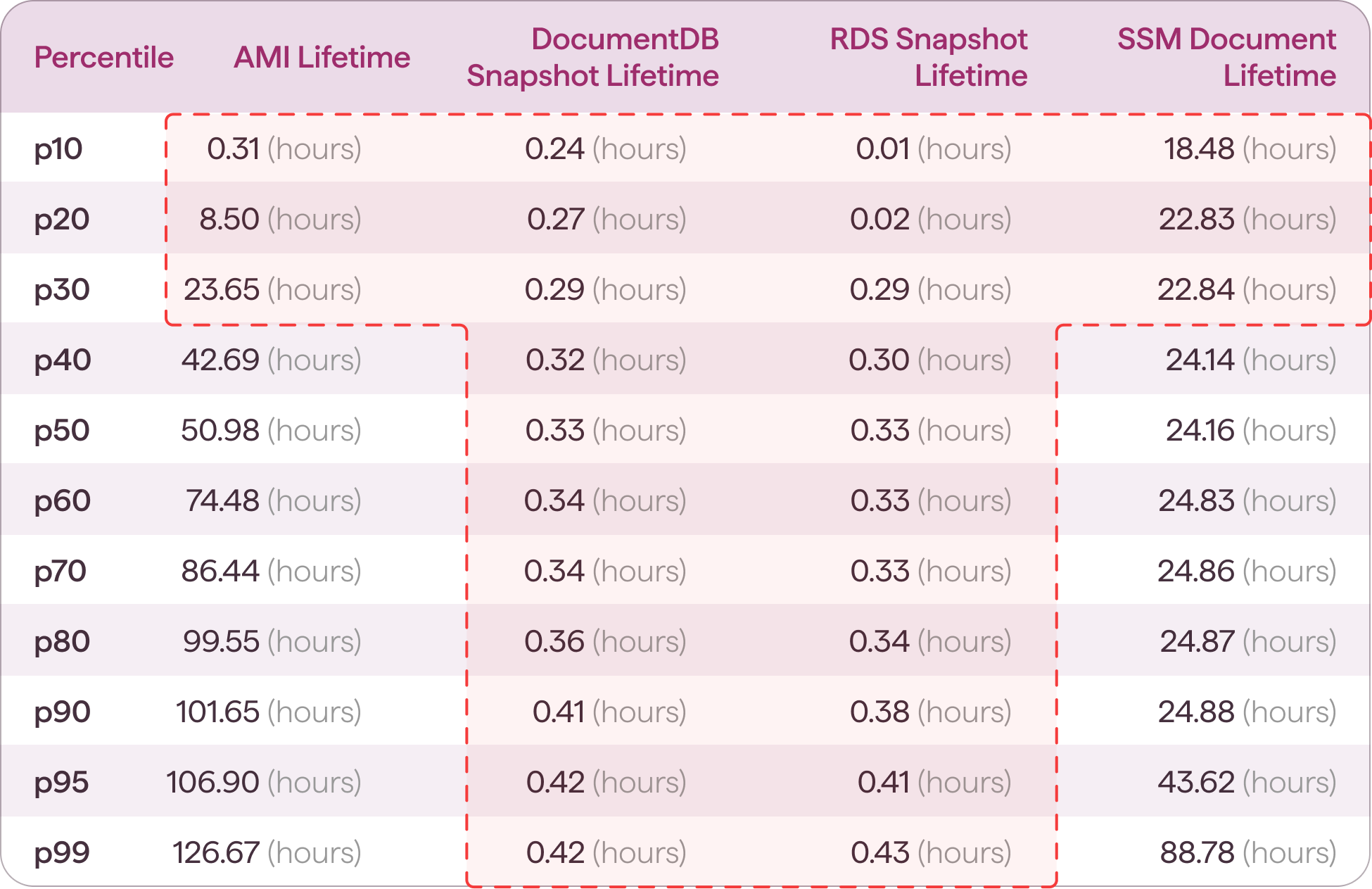

As shown in Figure 6, 20% of publicly shared RDS snapshots appeared and disappeared in less than two minutes. More strikingly, 99% of both RDS and DocumentDB snapshots that were deleted disappeared within 30 minutes of creation. Approximately 30% of SSM documents and AMIs disappeared within 24 hours, which is shorter than the interval some CNAPP tools require to complete a full scan.
The implication is significant: defenders not only lack enough time to remediate the exposure, but in most cases, traditional CNAPP tools would never detect it in the first place.
Can an Attacker Exploit the Exposure Fast Enough?
While discovery is nearly instantaneous, can an attacker copy the data before the exposure is remediated and the snapshot disappears?
Here's the trick: an attacker does not need to extract all the data during the exposure window. Since copying a snapshot into a different AWS account is extremely fast, they only need the exposure to last long enough to initiate the copy. Once the copy operation has been successfully completed, the attacker can retain the snapshot in their own account and analyze it later.
For example, an attacker can fully automate this workflow: monitor newly exposed snapshots, copy each one to their account, and restore the database later.
aws rds restore-db-instance-from-db-snapshotOnce the restored database is active, the attacker can connect, dump the contents, and scan for sensitive credentials. This demonstrates how even a brief exposure window can result in the complete compromise of the exposed data.
Is Valuable Data Actually Exposed?
To test this, we built an automated extraction pipeline and ran it on a small sample of recently created, publicly shared RDS snapshots. The pipeline restored each snapshot, reset the master password, dumped the database, and scanned the extracted data using TruffleHog along with custom detection patterns.
We searched for AWS account IDs, which appeared in every analyzed snapshot, as well as patterns associated with secrets, email addresses, private keys, and credit card numbers.
Across our test sample of 24 public snapshots, the results provided clear evidence of meaningful data exposure.
Among the snapshots that we successfully restored and analyzed, we identified the following categories of data:
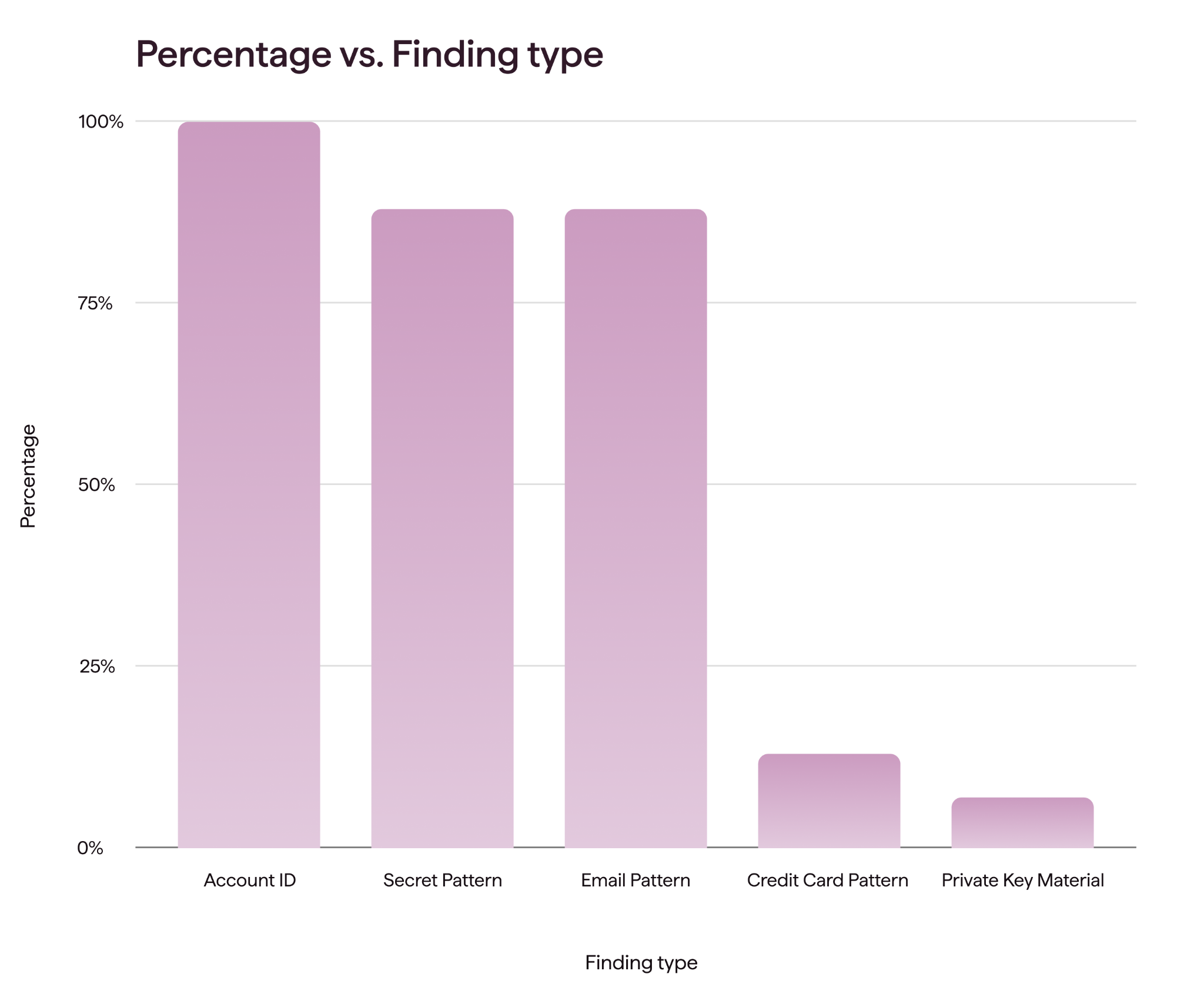
The conclusion is clear: publicly shared resources contain real, usable business data.
While AWS explicitly warns that public snapshots may expose sensitive business information, many organizations either overlook this warning or underestimate the risk. Upon verifying these initial findings, we immediately stopped the extraction process.
To be clear, this is not an AWS vulnerability; it is a customer misconfiguration. AWS provides clear warnings. The fundamental issue is that once a resource is shared publicly, it becomes immediately accessible to everyone.
Our findings substantially expand on previous industry research by Mitiga, which highlighted the risks associated with publicly shared RDS snapshots.
However, when it comes to how organizations should address this issue, we reach a very different conclusion.
The Only Effective Answer
These findings expose a deeper flaw in how we address cloud security issues.
Many industry analyses conclude by proposing detection as the solution, demonstrating how to identify active exposures after the fact. However, for ephemeral cloud misconfigurations, reactive detection is simply not enough.
When publicly shared resources can be discovered and exploited almost immediately, reactive scans offer little practical protection. By the time an alert is generated, triaged, and routed for remediation, an attacker would have already copied the data.
The evidence leads to one clear conclusion: the only effective long-term strategy is prevention.
Prevention
Aryon was engineered specifically to solve this problem, enabling organizations to deploy preventive controls safely in production environments without introducing friction between security and operations teams.
This preventive model applies to the public-sharing risks outlined in this analysis, as well as to other cloud misconfigurations and attack vectors.
The primary mechanism for enforcement is the Service Control Policy (SCP), which restricts principal permissions across an AWS Organization based on defined actions, resources, principals, and conditions. Please note that the baseline controls discussed below are not production-ready. Successfully deploying these controls requires precise calibration. To implement preventive guardrails in a production environment without creating friction, an automated ecosystem for policy tuning is essential. Platforms such as Aryon can help organizations tune, test, and deploy these controls while preserving operational stability and business continuity.
RDS Snapshots
Publicly shared RDS snapshots must be unencrypted, and their sharing attributes must be explicitly modified to make them public.
AWS does not currently expose SCP condition keys that make it possible to differentiate between public sharing and private cross-account sharing.
Therefore, organizations have two primary preventive strategies:
- Completely disable RDS snapshot sharing - since the sharing attribute is the only attribute available for RDS snapshots, we can prevent attribute modification entirely:
"statement": {
    "Sid": "DenyModifySnapshotAttributes",
    "Effect": "Deny",
    "Action": [
      "rds:ModifyDBSnapshotAttribute",
      "rds:ModifyDBClusterSnapshotAttribute"
    ],
    "Resource": "*"
}- Enforce storage encryption at rest, which inherently prevents snapshots from being shared publicly:
"statement": {
      "Sid": "DenyUnencryptedRDSInstance",
      "Effect": "Deny",
      "Action": ["rds:CreateDBCluster"],
      "Resource": "*",
      "Condition": {
        "BoolIfExists": {
          "rds:StorageEncrypted": "false"
        },
      }
    }
Please note that the rds:CreateDBInstance API action should also be restricted. However, the control must be carefully calibrated for different database engines to avoid disrupting legitimate operations.
Each control presents distinct trade-offs. Disabling all snapshot sharing provides immediate protection against public exposure, but it also restricts legitimate cross-account private sharing. This limitation remains a necessary security trade-off until AWS introduces more granular condition keys. Requests to make a snapshot public include the following structure:
{
    "valuesToAdd": [
        "all"
    ],
}
Enforcing database encryption effectively protects newly created resources because encrypted snapshots cannot be made public. However, this control is not retroactive; existing unencrypted database instances can still generate snapshots that are vulnerable to accidental public sharing.
To maximize protection, we recommend deploying both controls, with explicit exceptions for environments that require private cross-account sharing.
DocumentDB Snapshots
Non-elastic Amazon DocumentDB clusters are actually implemented using Amazon RDS, so the preventive policies outlined above also apply to them. For Amazon DocumentDB elastic clusters, public snapshot sharing is inherently restricted because the clusters are encrypted at rest by default.
AMI
AWS provides a native, account-level setting to block public sharing for AMIs, which prevents newly created AMIs from being exposed. It is enabled by default. For additional details, refer to the AWS Documentation. Once enabled, organizations can use an SCP to ensure this protective configuration cannot be disabled.
The following Service Control Policy prevents accounts from disabling this protection by denying changes that would disable the “block public sharing for AMIs” setting:
{
    "Statement": [
        {
            "Sid": "DenyDisableImageBlockPublicAccess",
            "Effect": "Deny",
            "Action": "ec2:DisableImageBlockPublicAccess",
            "Resource": "*"
        }
    ]
}
SSM Documents
Similar to AMIs, AWS provides an account-level setting to block public sharing of Systems Manager (SSM) documents. Unlike the equivalent AMI setting, however, it is not enabled by default. Organizations should first follow the AWS documentation to enable the setting. Once the setting is enabled, the following SCP can be used to lock the configuration and prevent unauthorized changes:
{
    "Version": "2012-10-17",
    "Statement": [
     {
        "Sid": "DenySSMDocPublicSharingSetting",
        "Effect": "Deny",
        "Action": [
"ssm:UpdateServiceSetting",
"ssm:ResetServiceSetting"
  ],
        "Resource": "arn:aws:ssm:*:*:servicesetting/ssm/documents/console/public-sharing-permission"
        }
    ]
}
Historical Risk Assessment
While preventive controls help secure cloud infrastructure going forward, it is still useful to review historical exposures to determine whether your environment has already been exposed.
The following guide details how to parse AWS CloudTrail logs using the AWS CLI to identify whether any resources were publicly shared within the last 90 days.
First, initialize the lookback window variable:
START=$(date -u -d '90 days ago' +%Y-%m-%dT%H:%M:%SZ 2>/dev/null || date -u -v-90d +%Y-%m-%dT%H:%M:%SZ)1. Analyze Public-Sharing Events for Amazon RDS and DocumentDB Snapshots
aws cloudtrail lookup-events --lookup-attributes AttributeKey=EventName,AttributeValue=ModifyDBSnapshotAttribute --region REGION --start-time "$START" --query 'Events[].CloudTrailEvent' --output json | jq -r '.[] | fromjson | select((.requestParameters.valuesToAdd // []) | index("all")) | .requestParameters.dBSnapshotIdentifier' | sort -u2. Analyze Amazon Machine Image (AMI) Public Sharing Events
aws cloudtrail lookup-events --lookup-attributes AttributeKey=EventName,AttributeValue=ModifyImageAttribute --region REGION --start-time "$START" --query 'Events[].CloudTrailEvent' --output json | jq -r '.[] | fromjson | select((.requestParameters.launchPermission.add.items // []) | any(.group=="all")) | .requestParameters.imageId' | sort -u3. Analyze Systems Manager (SSM) Document Public Sharing Events
aws cloudtrail lookup-events --lookup-attributes AttributeKey=EventName,AttributeValue=ModifyDocumentPermission --region REGION --start-time "$START" --query 'Events[].CloudTrailEvent' --output json | jq -r '.[] | fromjson | select((.requestParameters.accountIdsToAdd // []) | index("all")) | .requestParameters.name' | sort -u
Notes & Sources
Continue reading

Healthcare: The Most Expensive Sector to Get Wrong
Healthcare faces the highest data breach costs of any industry, averaging $6.64 million per incident in 2026. As cloud adoption accelerates, misconfigurations threaten patient data, HIPAA compliance, and critical clinical operations. Discover why detection alone isn't enough and how preventive cloud security stops risky configurations before deployment-without disrupting patient care.
Exploiting Cloud Misconfigurations, Part 2: How Attackers Discover Cloud Resources
The first thing an attacker needs is a target, so an attack naturally begins with resource discovery. During discovery, the attacker builds and expands a database of resource identifiers. These resources are then checked periodically for exploitable conditions. A resource may be discovered long before an opportunity to exploit it arises.

Ten Years Is a Long Time to Be Wrong
For nearly a decade, a cloud misconfiguration at Toyota left sensitive vehicle data belonging to approximately 2.15 million customers accessible from the internet. What began as a single configuration mistake in 2013 went undetected until 2023, exposing a fundamental weakness in traditional cloud security: detecting misconfigurations only works when someone is looking. And when Toyota finally investigated, it uncovered additional exposures. The incident raises a critical question for every organization operating in the cloud: Why wait to discover a security risk when you could prevent it from existing in the first place?
.png)
The Key That Should Not Have Worked
A leaked cloud credential is usually treated as a detection problem. Find it, revoke it, rotate it, and move on. But the Volkswagen and Cariad data exposure raises a more important question: why was there a long-lived credential worth stealing in the first place? When a single reusable key can unlock sensitive cloud data, the leak is only part of the problem - the configuration that allowed that key to exist is the other.
.png)
The Role That Should Never Have Existed
On 29 July 2019, Capital One disclosed that an attacker had taken data relating to roughly 106 million people across the United States and Canada. The attacker was Paige Thompson, a former Amazon Web Services engineer, who was arrested the same day and convicted on computer fraud charges in June 2022. The company's settlements reached around $190 million.
Exploiting Cloud Misconfigurations: How Attackers Find Cloud Attack Paths (Part 1 - The Basics)
Cloud attacks don’t always begin with a vulnerability. Often, they begin with a misconfiguration that gives an attacker a path in. In Part 1 of this series, we look at cloud environments from the attacker’s perspective and break down the three conditions behind many exploitable cloud attack paths: Resource DIscovery, Network Accessibility, and Identity-Based Access.